
Instant Oxford Word Lookup Tool
Overview
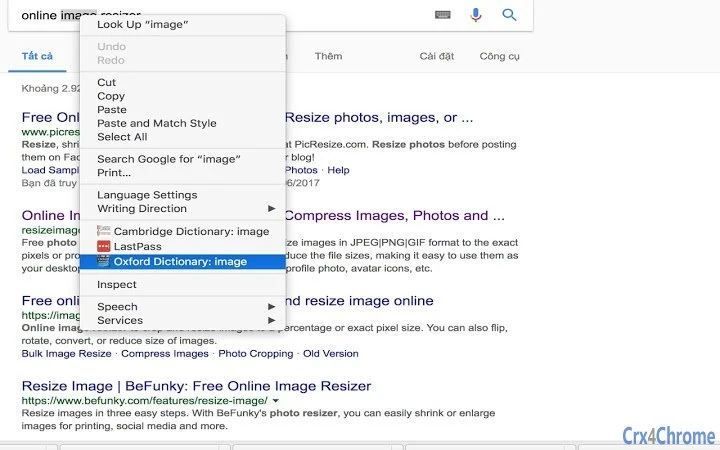
The software provides a seamless way to look up word definitions directly from the context menu by right-clicking any word. Designed specifically for English learners and language enthusiasts, it integrates with the Oxford Advanced Learner's Dictionary to deliver accurate, authoritative definitions. This tool eliminates the need to switch between applications or manually search online, streamlining the learning process. It is ideal for students, educators, and professionals who frequently encounter unfamiliar vocabulary in documents, web pages, or emails.
By embedding dictionary functionality directly into the operating system, the software enhances productivity during reading, writing, and study sessions. The integration allows users to instantly access meanings without disrupting their workflow. Although the developer has not provided additional background, the tool’s focus on language learning suggests a targeted approach to supporting educational goals. Real-world usage scenarios include studying academic texts, preparing presentations, or improving writing skills through immediate vocabulary clarification.
Key Features & Capabilities
- Right-click dictionary lookup – Access definitions by right-clicking any word in documents, browsers, or applications.
- Integration with Oxford Advanced Learner's Dictionary – Ensures reliable and high-quality definitions from a trusted source.
- Context menu accessibility – Available across all supported platforms without requiring additional setup.
- Lightweight design – Only 10 MB in size, minimizing impact on system resources.
- Multi-platform support – Functions on both Windows and Mac operating systems.
Users can leverage this tool during reading assignments, while writing essays, or when reviewing technical content. The ability to look up words instantly helps reinforce vocabulary retention and improves comprehension. The feature is especially beneficial for non-native speakers navigating complex texts. Since the software operates via the context menu, it requires no learning curve and fits naturally into existing workflows.
User Interface, Workflow & Performance
The software operates through the system’s context menu, meaning it does not require a dedicated interface window. This minimalist design reduces visual clutter and keeps the user focused on their primary task. Navigation is intuitive: simply select a word, right-click, and choose the Oxford Dictionary option to view the definition. The workflow is streamlined and efficient, making it suitable for quick, repeated use.
Performance details were not specified by the developer. However, given its lightweight nature and minimal interaction model, the tool is expected to function smoothly across a range of devices. The developer did not provide additional system requirements, so resource usage such as CPU or RAM behavior remains unspecified. Stability is assumed to be consistent with standard desktop utilities, but no formal testing data was made available. Overall, the software appears optimized for background operation with minimal interference.
Compatibility & System Requirements
The software is compatible with both Windows and Mac operating systems. It is available in version 1.0.0 and has an installation size of 10 MB. The developer did not specify exact system requirements, including minimum processor speed, RAM, or disk space beyond the total file size. Compatibility information is limited to the supported platforms, with no mention of older OS versions or hardware constraints.
Users should ensure their system meets general requirements for running desktop applications. The absence of detailed specifications means that compatibility with legacy systems cannot be confirmed. Installation is straightforward, though the developer did not provide a step-by-step guide. The software is designed to integrate seamlessly with the native context menu, suggesting broad compatibility with standard desktop environments.
Pros and Cons
Pros
- Instant word lookup without switching applications
- Reliable definitions from Oxford Advanced Learner's Dictionary
- Minimal system resource usage (10 MB size)
- Works on both Windows and Mac platforms
- No complex setup required
Cons
- No information on system requirements beyond file size
- Performance metrics not disclosed
- Only supports Oxford dictionary integration
- Limited to right-click context menu access
- Developer background not available
FAQ Section
Is this software compatible with my Windows or Mac system?
The software is designed to work on both Windows and Mac operating systems. However, specific version compatibility was not provided by the developer.
Is the software safe to install and use?
As a desktop utility with no known security issues reported, it is considered safe for general use. The developer did not provide a digital signature or security verification details.
How often does the software update?
Update frequency was not specified. Users should check the official source for the latest version.
What license type does the software use?
The software is available for free, but the specific license terms were not disclosed.
Can I use this tool offline?
Offline functionality was not confirmed. The tool relies on integration with the Oxford dictionary, which may require an internet connection for access.
Final Thoughts
For English learners and language professionals, this tool offers a simple yet powerful solution to enhance vocabulary acquisition. Its seamless integration with the system context menu removes friction from the learning process, allowing users to focus on comprehension and expression. While details on performance and system requirements are limited, the lightweight footprint and cross-platform availability make it accessible to a wide audience.
Despite the lack of developer information and technical specifications, the core functionality is well-executed and purpose-built. The integration with Oxford Advanced Learner's Dictionary adds credibility and value. This software is especially beneficial for students, writers, and educators who regularly engage with English-language content.
Download Instant Oxford Word Lookup Tool now to boost your language learning efficiency and streamline your daily reading and writing tasks.







